
XWatch
a menu bar app that watches your public ip and tells you what the internet actually knows about it.
curl -fsSL https://xstral.com/xwatch.sh | bash
builds on your mac in a few seconds. no password needed.
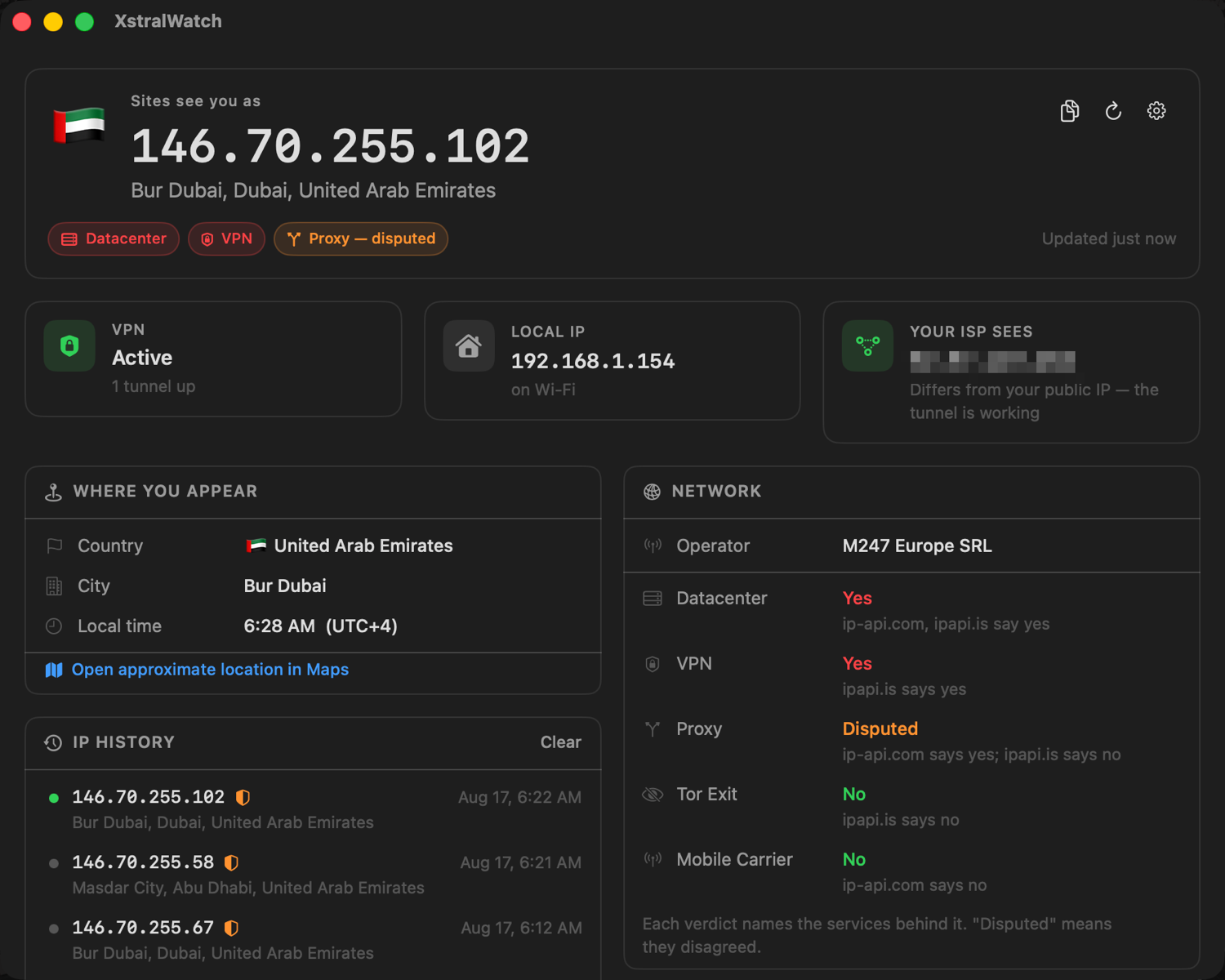
what it tells you
most tools show you an ip and a city and call it a day. xwatch asks four services at once and tells you where they disagree, cause they disagree way more than you’d think.
four sources, checked against each other
ip-api, ipapi.is, ipwho.is and ipinfo. every answer says which services it came from, and if they disagree it says disputed instead of quietly picking one.
proof your vpn is working
it does a second lookup that skips the tunnel and goes straight out your real connection. if that address is different from your public one, your vpn is actually carrying your traffic.
datacenter and proxy detection
whether you look like a vpn exit, a hosting range, a tor exit or a mobile carrier. that’s the stuff that decides if a site quietly blocks you.
a log of every change
it adds an entry when your subnet, country or operator changes. not every time your vpn shuffles you to another address in the same pool, that would just be spam.
notices when the network changes
connect a vpn or switch wi-fi and it refreshes by itself. you don’t have to touch anything.
light and dark
follows your system theme live, or you can force one. quick summary in the menu bar, full dashboard when you want the details.
how it got here
three versions, and one of them was confidently wrong about something important.
version 1 beta · never released
a dev build that lived entirely in the menu bar. one line of text, one source, and no way to tell when that source was lying. it went stale every time the network changed, and it only ever ran on my mac.
version 2.0 first real release
the rewrite, and where this stopped being a script and turned into an actual app, with a proper dashboard next to the menu bar. four sources instead of one, checked against each other, and it tells you when they disagree instead of picking a winner. that’s because v1 called a datacenter vpn exit “residential”, and it was just wrong. i tested it against vpn exits in about a dozen countries, madrid, singapore, new delhi and more, and the readings held up.
version 2.1 current
you pick how often it checks now: every 10 seconds, 30 seconds, minute, 10 minutes, 30 minutes, or only when you ask. fixed a bug where it launched silently and you had to go hunting through the menu bar to find it. added install and page counters, plus a few small fixes.
why a command and not a download
macos puts a com.apple.quarantine flag on anything a browser
downloads. then gatekeeper refuses to open it unless it’s signed with a
paid apple developer id and notarized by apple. on apple silicon the message
even says “the app is damaged and can’t be opened”,
which is scary and just not true.
command line tools don’t set that flag, and something built on your own mac was never downloaded in the first place. so there’s nothing to quarantine and nothing to warn you about.
to be clear though: this doesn’t make XWatch
verified, it just means macos stops asking. piping a script into a
shell is also how a lot of malware gets in. that’s why this one downloads
readable source instead of a binary, checks it against a published sha-256,
and never asks for sudo. read it first if you want:
curl -fsSL https://xstral.com/xwatch.sh | less
other ways to install
the installer takes options, and you can always build it yourself.
# install somewhere else, and don't open it after
curl -fsSL https://xstral.com/xwatch.sh | bash -s -- --to ~/Applications --no-launch

# or build it yourself
curl -fsSL https://xstral.com/xstralwatch-2.1.tar.gz | tar -xz
cd xstralwatch-2.1 && ./build.sh
building needs the xcode command line tools (xcode-select --install), nothing else. the app installs as XstralWatch.app, that’s the name it’s always had. xwatch is just shorter to type.